What the Kidfence setup profile installs, what the logs contain, and how new sites get categorized
A parent asked us three good questions before installing Kidfence on their child’s Mac. They had run the installer past an AI, and it flagged a certificate in the setup profile and a log upload. Both were real. Here is what each one is, what it can and cannot do, and what we fetch when your child reaches a site we have never seen.
Software that manages a child’s computer deserves suspicion, and the questions we got were exactly the right ones. Our privacy policy also had a sentence that was imprecise about the certificate, which we have now corrected. This post is the long version of the answers.
Question one: the profile installs a certificate. Can Kidfence read HTTPS?
No. To see why, it helps to separate two things that both get called a “root certificate.”
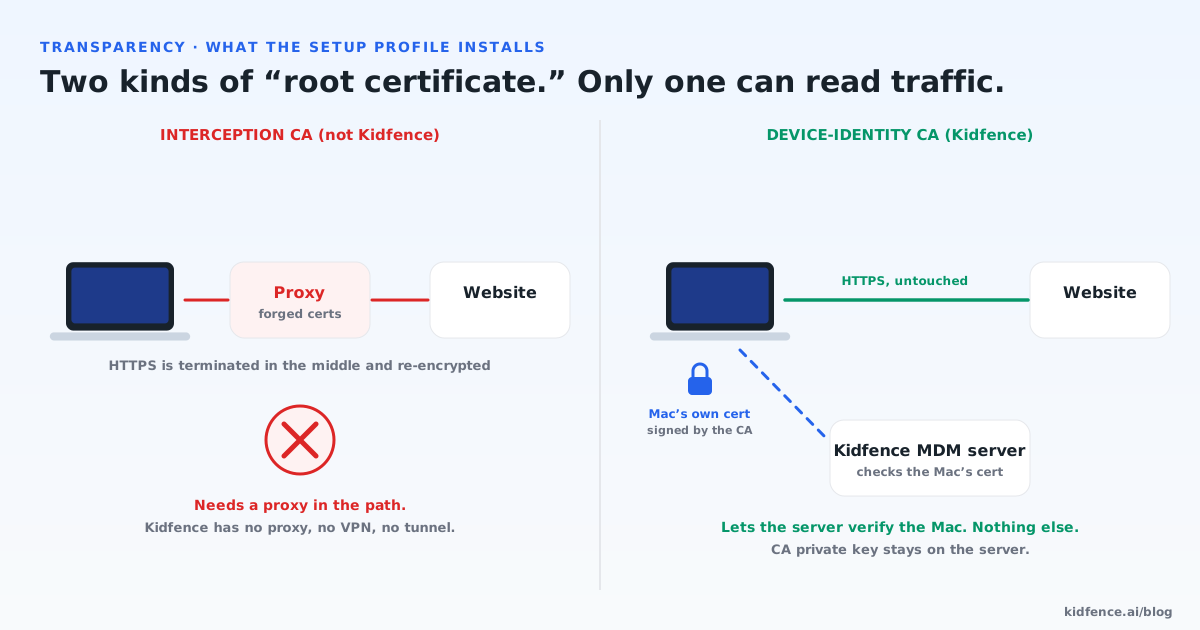
An interception CA is what corporate proxies and some “monitoring” tools use. It only works together with a proxy that sits between the browser and the website. The browser connects to the proxy, the proxy presents a forged certificate for the site signed by that CA, the browser trusts it because the CA was installed, and the proxy reads the session before re-encrypting it toward the real site. Remove the proxy and the CA does nothing. The proxy in the path is the part that reads traffic.
A device-identity CA works in the opposite direction. Apple’s device-management protocol needs the server to know that a check-in really comes from an enrolled Mac and not from anyone on the internet. During setup your Mac generates a private key that never leaves it and sends a certificate request to our server. Our CA signs that request. From then on the Mac presents that certificate when it talks to our management server, and the server accepts only certificates it issued. The CA’s own private key stays on the server; the Mac holds only the CA’s public certificate, which is why it appears in the profile. It is in the profile because macOS 26 requires the Mac’s identity to chain to a trusted anchor before it treats managed settings, like the locks on our extensions, as fully authoritative.
So the honest test is not “is there a CA” but “is there anything in the path.” Kidfence has no proxy, no VPN, and no tunnel. Our web filter is Apple’s content-filter extension, the same interface enterprise security products use. It receives the first bytes of each connection, reads the server name from the TLS handshake, and answers allow or block. That interface cannot read or alter encrypted payload, and it cannot redirect a connection anywhere. Adding a proxy would mean shipping a different kind of system extension that you would have to approve separately. And our own servers use publicly issued TLS certificates, so the identity CA is not involved in securing any connection your devices make.
One thing we are saying plainly rather than hiding: the CA certificate itself carries no usage restriction. We are testing whether we can constrain it to client authentication only without macOS downgrading the management authority, and we will update this post with the result. Nothing in the product depends on that restriction; it would simply remove a capability we hold and do not use.
Question two: what is in the diagnostic log?
During the beta, the software on the Mac and the parent app on the iPhone send us a technical log so we can debug problems: a site blocked in error, a filter that stopped answering, a pairing that never completed. The parent who wrote to us wanted to know whether websites, tabs, or app activity were in it. Here is what actually leaves the device.
Every line is scrubbed on the device before it is sent. User folder names become a placeholder, so nothing reveals the account name. Email addresses, full URLs, and cryptographic keys are replaced. Website names are replaced with a placeholder, so a line about the filter evaluating a connection does not say which site. The log never contains URLs, page contents, search terms, open tabs, screenshots, or anything your child typed.
Two beta exceptions we want on the record. When a site is blocked, its domain is included, because “the filter blocked something” is useless to a support engineer without knowing what. And the identifier of the app in the foreground appears in status lines, because that is how we verify the screen-time features are counting the right thing. Logs are deleted from our server after 14 days. The activity summaries you see in the parent app are a separate channel: they travel from the Mac to your iPhone end-to-end encrypted, and our server relays them without being able to read them.
Question three: how does Kidfence know what a site is?
Most sites are in a built-in library, so the filter already knows that a given domain is gaming, streaming, or adult, and nothing needs to be looked up. The interesting case is a site we have never seen. Your child opens it, and the filter has to decide what it is.
What happens: the Mac fetches that site’s public front page, not the page your child was on, as an anonymous visitor in a fresh session with no cookies and no sign-in. It reads at most the first 64 KB, keeps only the page title and the meta description, capped at a few hundred characters, and sends those with the site name to our server. An AI model reads that snippet and returns a category. The category is stored by site name alone, so the next family to reach the same site gets an instant answer, and the snippet itself is discarded.
What this means for privacy: the request contains information about a public website, not about your child. It cannot include what your child read, typed, or was logged into, because the fetch happens outside their browser session and can only see what any stranger visiting the front page sees. The request is signed by the Mac so that only paying families can use the service; the stored category is not linked to your family.
Why we answered in this much detail
Because “trust us” is not an answer for software that runs as root on a child’s computer. Every mechanism above can be checked: the profile can be decoded and its certificate inspected, the filter extension’s type is visible in System Settings, and the scrubbing rules ship in the app. If you find something that does not match this post or the privacy policy, tell us, and we will fix the software or the words, whichever is wrong.
Common questions
Can the Kidfence certificate be used to decrypt my child’s traffic?
No. Decrypting HTTPS needs a proxy in the network path presenting forged website certificates, and Kidfence has no proxy, VPN, or tunnel. The certificate in the setup profile is a device-identity CA: it signs each Mac’s own certificate so the Mac can prove itself to the management server. Its private key never leaves our server, and the web filter uses Apple’s content-filter interface, which cannot read or alter encrypted content.
What personal information is in the beta diagnostic log?
None by design. Before a line leaves the device, user folder names, email addresses, full URLs, cryptographic keys, and website names are replaced with placeholders. Two beta exceptions: the domain of a site that was blocked, and the identifier of the app in the foreground. Logs are deleted after 14 days.
Does the site categorization see what my child was reading?
No. For a site not in the built-in library, the Mac fetches that site’s public front page as an anonymous visitor with no cookies, keeps only the title and meta description, and sends those with the site name. It never sends the page your child was on, the full address, or anything they typed. The category is stored by site name only; the snippet is not kept.