More protection than Screen Time, built for the Mac. A kid can’t turn it off.
Screen Time is free, built in, and a good first step, especially on a phone. On a Mac it’s easy to bypass and limited to time controls. Kidfence is a complete protection layer built for macOS: app and game blocking by code signature, network filtering, locked DNS and SafeSearch, browser lockdown, and screen-time that freezes, all enforced from a system service that a kid can’t simply switch off.
On a Mac, Screen Time can often be worked around: creating or switching to another user account, signing out of the Apple ID, or changing the system clock, and some of these have published write-ups. Kidfence is designed so those don’t work. Enforcement runs from a system service that stays in effect across a new account, a sign-out, a clock change, and a reboot, and removing it needs the parent admin password the child doesn’t have.
Protection that goes further than Screen Time
Screen Time does time limits and basic web restrictions. Kidfence layers in the protections a determined kid on a Mac actually tests.
A pause button that actually lands
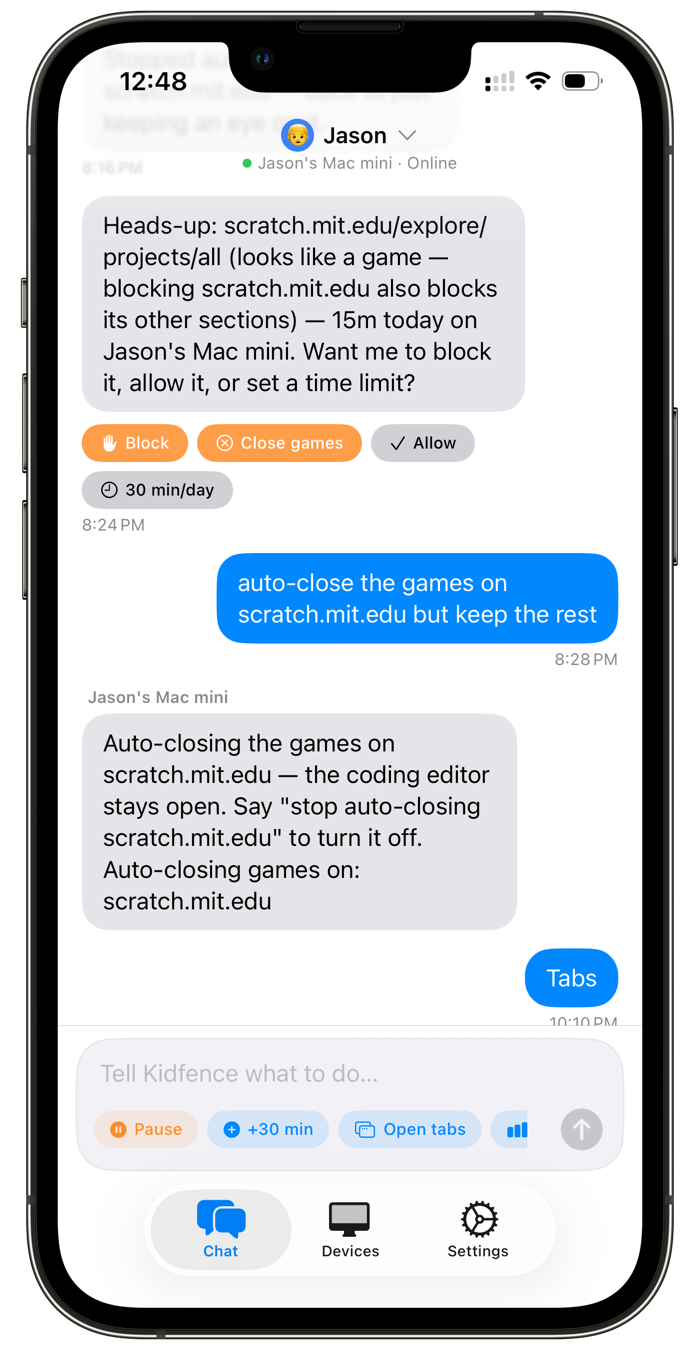
The nightly “time for bed” standoff is what parents use Kidfence for most. Tap pause on your phone and the Mac freezes distracting apps within seconds, then confirms back that it took effect. Screen Time’s remote Downtime travels over iCloud sync: it can take minutes to reach a Mac, and it never tells you whether it applied.
Apps & games, blocked for real
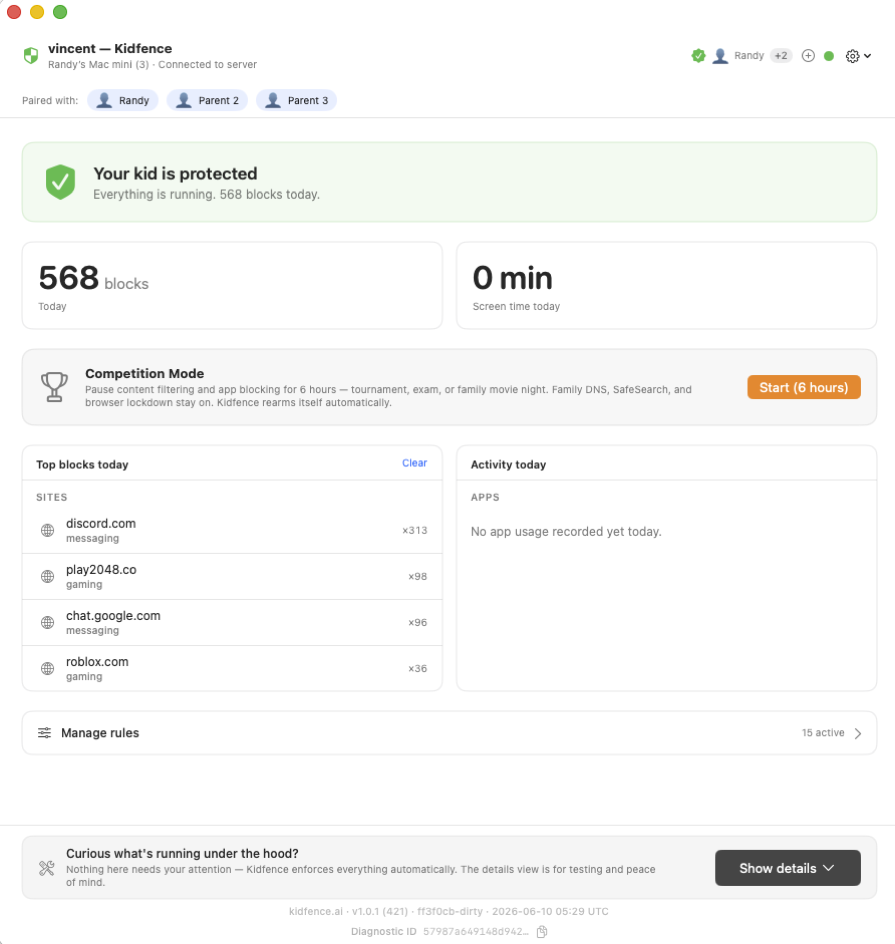
Roblox, Minecraft, Steam, Discord, or any app, blocked by code signature, so renaming the app to Homework.app doesn’t bypass it. Endpoint Security blocks at launch.
The whole web, filtered without a VPN
Adult sites, social, and time-sinks blocked at the network layer via SNI, with category and per-domain rules that go well beyond Screen Time’s web limits. No tunnel, HTTPS stays intact.
AI catches new sites Screen Time can’t
Kids hunt for fresh game, proxy, and unblock sites every week. Screen Time has no notion of categories for an unknown site. Kidfence uses AI to categorize unfamiliar sites on the fly, beyond a curated list of roughly 500,000 known ones, and blocks games, adult, and proxy sites so a brand-new URL isn’t an automatic loophole.
Locked DNS & SafeSearch
Family-safe DNS and SafeSearch on Google, Bing, and YouTube are pinned on at the network layer. They can’t be toggled off in the browser, and manual DNS edits are reverted automatically.
Browser lockdown
Kids download Firefox, Brave, or Arc to dodge filters. Kidfence blocks every browser except Safari and Chrome by signature, and disables incognito and private browsing, so there’s no filter-free way around it.
Closes the search-results loophole
Screen Time’s “Allowed Websites Only” is painful in practice: one page pulls in dozens of other domains you’d have to approve one by one, and it doesn’t pin SafeSearch on. A plain Google search for “js games” then surfaces playable games right in the results. Kidfence enforces SafeSearch, blocks game domains, and locks the browser down, so that gap is closed.
Closes the Gmail Chat loophole
Kids use school Gmail to chat all day. Kidfence’s browser extension hides the Chat, Spaces, and Meet panels while email keeps working, something Screen Time can’t do.
Instant “what’s he on?” with AI advice
Ask any time and get the live list of every tab open right now, with how long they’ve lingered on each. The AI reads it back in plain English, flags a quick break that’s become an hour on a game site, and suggests what to do, instead of leaving you to dig through Settings panes and charts.
Kidfence vs Apple Screen Time on the Mac
Screen Time is free and built in. This is where Kidfence does more on the things a determined kid tends to test.
Kidfence
Apple Screen Time
Kid can’t disable it with a new user account
Yes
No
Unaffected by changing the system clock
Yes
Can be exploited
Still enforced right after reboot
Yes
Loads late
App blocking survives renaming the app
Code signature
Partial
Locks DNS & SafeSearch on at the network layer
Yes
No
Filters every site (no approve-one-by-one allow list)
Yes
Allow-list is impractical
AI categorizes brand-new / unknown sites on the fly
Yes
No
Blocks unauthorized browsers & incognito
By signature
No
Hides Gmail Chat, Spaces & Meet
Yes
No
Bedtime freezes the app, not just a passcode prompt
Freezes the app
Reminder / passcode
Remote pause lands in seconds, with confirmation
Seconds, confirmed
iCloud sync can lag; unconfirmed
Controlled by plain-English chat
Yes
Settings panes
Shows you every tab open right now
Yes
No
Price
$9.99/mo · $79.99/yr
Free
Comparison reflects publicly documented behavior per Apple support documentation and independent testing as of June 2026. Screen Time behavior varies by macOS version and configuration. Apple, macOS, and Screen Time are trademarks of Apple Inc.; Kidfence is independent and not affiliated with or endorsed by Apple.
Screen Time first. Kidfence when it isn’t holding.
If Screen Time is doing the job for your family, keep using it, it’s free and well made. Kidfence is for the Mac where it isn’t holding up: a kid who’s found the workarounds, a laptop that’s really a homework machine, and a parent who wants protection that goes past time limits. Start with a 14-day free trial, no card needed.
Common questions
How does a kid get around Screen Time on a Mac?
The usual ones we hear are: creating or switching to another user account, signing out of the Apple ID, changing the system date and time, and deleting and re-downloading an app. Some of these have published write-ups. Kidfence is designed so those don’t work: enforcement is system-wide and survives account changes, sign-out, clock changes, and reboots.
What about Apple’s “Allowed Websites Only” setting?
It works in theory but rarely in practice. Modern pages pull resources from dozens of other domains, so an allow-list means approving site after site just to make ordinary pages load, and it doesn’t pin SafeSearch on. With a search engine reachable, a query like “js games” returns playable games right in the results. Kidfence takes the opposite approach: filter everything by default at the network layer, enforce SafeSearch, block game domains, and lock the browser down, so there’s no allow-list to maintain and the search loophole is closed.
Can’t I already pause the Mac remotely with Screen Time’s Downtime?
Yes, with Family Sharing you can turn on Downtime for a child’s devices from your iPhone, and when it works it’s the same idea. The difference is in the delivery and the follow-through. The toggle travels over iCloud sync, which on Macs is well documented to lag, sometimes by minutes, and your phone never confirms whether the Mac actually applied it; you find out by walking over. Kidfence’s pause is pushed straight to the Mac over a live connection, lands in seconds, freezes distracting apps in place without losing work, and reports back so you know it took effect. If Kidfence’s protection is ever turned off on the Mac, you get notified of that too.
Is Kidfence worth paying for when Screen Time is free?
Only if free isn’t holding. If your kid hasn’t found the workarounds and a passcode is enough, Screen Time is great. Kidfence is worth it when the Mac is a real distraction battleground and you want enforcement a kid can’t shrug off, plus app blocking, web filtering, browser lockdown, and plain-English control that Screen Time doesn’t offer.
Does Kidfence replace Screen Time?
You can run both. Many families keep Screen Time for its built-in basics and add Kidfence for stronger app blocking, web filtering, and a bedtime that freezes apps. They don’t conflict.
What about their phone?
The phone is the one place the platform owners do this well: a managed child account with Family Sharing or Family Link is genuinely hard to disable. The Mac is the gap, and that’s what Kidfence focuses on, doing the Mac properly rather than every device half-well.
Keep their Mac on schoolwork
Start on your iPhone; it walks you through the Mac setup in about 10 minutes. 14-day free trial, no card, cancel anytime.